
What Google Really Thinks About JavaScript, Rendering & SEO
Martin Splitt from Google recently shared deep insights that help developers and SEOs make smarter decisions when building modern websites. His discussion clarified how Google’s systems handle JavaScript, structured data, and the ongoing debate between server-side and client-side rendering.
🤖 How Google Reads JavaScript Today
In a recent talk with Kenichi Suzuki of Faber Company Inc., Splitt explained how Google’s AI systems, including Gemini, process JavaScript. Both Gemini and Googlebot use the same Web Rendering Service (WRS) to understand websites.
“Gemini also renders… It’s basically like we have a service Googlebot uses, and Gemini uses the service as well,” he explained.
This makes Google’s AI-based tools better at understanding JavaScript-heavy sites compared to other crawlers.
The Future of ChatGPT Advertising
As OpenAI gears up to launch ChatGPT advertising, businesses should prepare for a new revenue channel. With predictions of $1 billion in initial revenue and up to $25 billion by 2029, this advertising model is set to reshape the landscape. CEO Sam Altman emphasizes transparency, likely ensuring ads are clearly marked, while personalization will tailor ads based on user data.
Companies targeting the 18-34 age group, which makes up over half of ChatGPT’s audience, should consider early adoption. This could mean lower costs and greater visibility compared to saturated platforms like Google Ads. Early adopters can dominate the space before competition heats up.
While details on ad appearance and pricing remain unclear, familiar auction models and targeting strategies from platforms like Google and Meta may apply. As ChatGPT continues to grow, integrating advertising could be a game-changer for businesses seeking brand awareness, traffic, and sales.
Don’t wait for ads to launch. Leverage OmniSEO to enhance your visibility on ChatGPT today. As organic mentions can drive significant traffic, now is the time to optimize your presence and prepare for the future of advertising.
YouTube Experiments with AI Overviews in Search Results
YouTube is testing an AI feature that curates video highlights in search results, potentially impacting viewership for content creators.
Are AI Overviews Killing Your Clicks? Ahrefs Thinks So
The introduction of AI Overviews in search results has led to a significant 34.5% decline in click-through rates for top-ranking pages.
Google Drops Organic Result wrt Local Listings
In January 2025, it seems like Google Search has brought a new update. Many call it “January 2025 Local Search Update”.
So, what is this January 2025 Local Search Update all about?
Well, with this update, Google Search has empowered Google Business Profile listings over the website’s organic search results.
For example, say you have a Google Business Profile listing and in that listing’s website field you have added your website’s URL.
Now earlier, both of your website’s URL and Google Business Profile listing were ranking but now Google Search will only rank the GBP listing.
So, if you are doing Local SEO (on website) and GBP optimization for your brand at the same, then it may happen that your organic traffic might degrade for the Local keywords.
The best way to resolve this issue is simply by changing the GBP profile’s URL to a different one if it is the same as the organic search result.
Product Comparison in Google AI Overviews
Back on May 14, 2024, Google released AI Overviews in the US and then soon after 5 months (i.e. in October 2024), made it available to over 100 countries and territories.
Since then, Google brings several new features to AI overviews, for example, solving complex maths queries, coding queries, multimodal search and more.
Now, to help out users coming with commercial intent, Google AI overviews has brought a new feature. It can do product comparisons.
For example, if you place queries like “iphone 15 vs iphone 15 pro”, it will give you a detailed comparison report (based on product specification or any other differentiating factor).
Impact
This new feature will impact websites doing product comparisons or affiliate marketing. However, it will give a new place for advertisers to put their ads on.
Google AI Overviews now helps you out with Coding
The competition between Google AI Overviews and ChatGPT is getting intense day by day.
And, it starts with bringing more similar feature in both of these platforms.
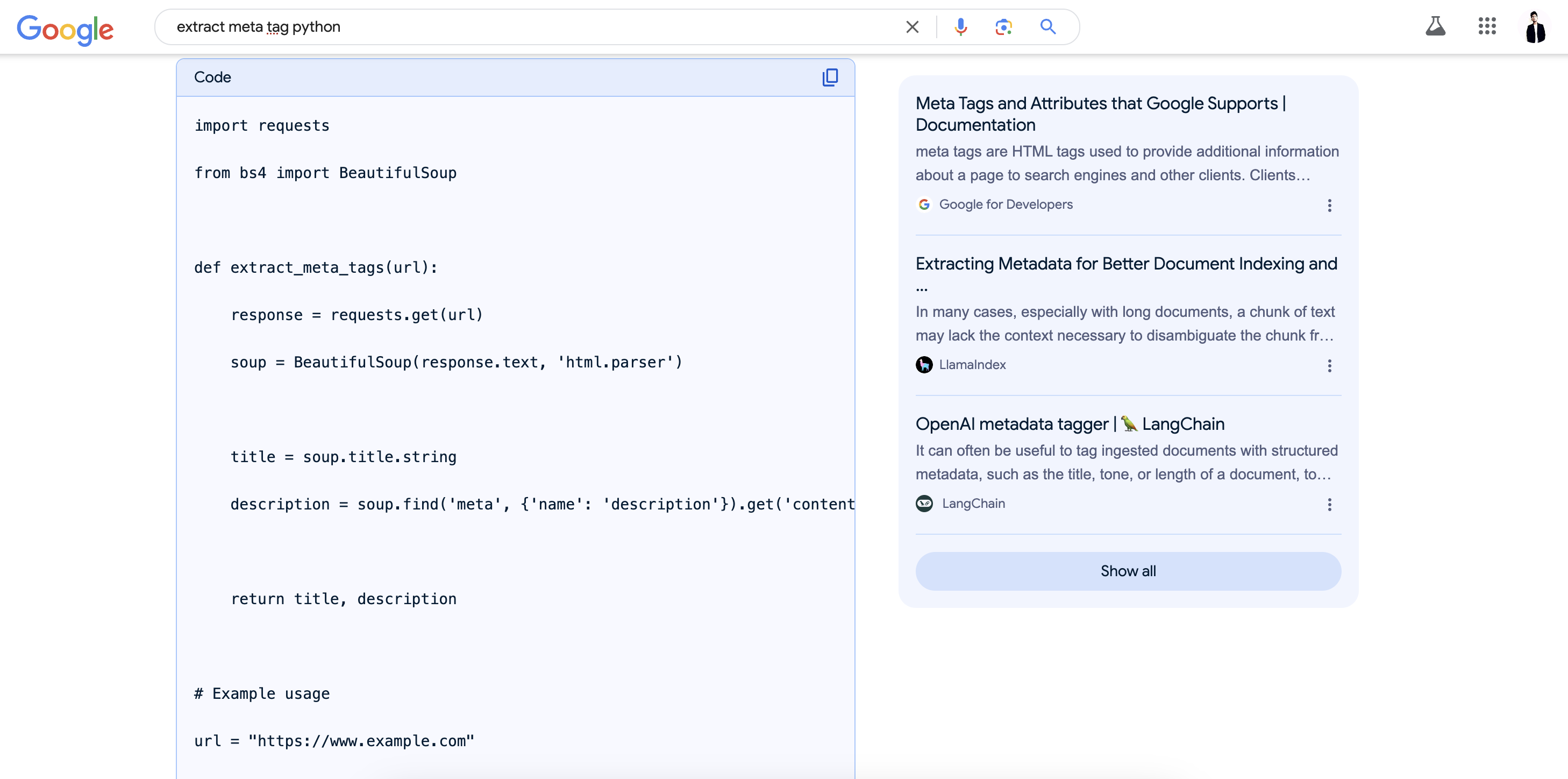
So, far ChatGPT had the capability to give you the desired programming code, but now Google AI Overviews has integrated the same directly in the Search Result, making Google Search more productive.
This came soon after a released data showcasing the usage of Google Search is getting degraded day by day.
Below, I have added a screenshot that shows how this feature works and looks actually in Google Search.

URL is Unknown to Google - What does it mean in SEO?
Through a LinkedIn Post, Adam Gent asked a question to Garry Illyes about an issue that you may have encountered in GSC.
And, the issue is about “URL is unknown to Google”.
Adam asked, Does URL is unknown to Google issue have the lowest crawl priority for the Google?
In response to this question, Garry Answered that “URLs encountering this issue in GSC are simply unknown to Google and hence these URLs have no crawl priority at all.”
Google Search Console now Updates Report Data in 30 Minutes Interval
To enhance the capability of fresh reporting, Google Search Console now refresh the report data in 30 minutes interval.
So, earlier, when we check the performance tab in Google Search Console, we see Last Updated 3 hours ago or 5 hours ago like that.
However, now it is showing Last Updated 3.5 hours ago, so here the .5 hours indicates, Google Search Console is now updating reports data in 30 minute interval.
What your opinion in the use of getting this fresh data in a short span of interval time? Let me know in the comments down below.
Google Removes Breadcrumbs from Mobile Search Result
To improve the user’s experience on Mobile Devices, Google removes breadcrumbs for Search Result.
Now, users on mobile devices will only see the domain name for the search result alongwith Title, Description, and other elements.
Breadcrumbs was introduced to improve the user experience because it helps in navigating the website. However, the screen size limitation of mobile devices truncates the breadcrumbs. That’s why Google decides to depreciate this feature from mobile devices.
However, breadcrumbs will remain present in Google Search for Desktop devices. And, there is no need to change the implementation strategy of breadcrumbs on the website.
This new change has been added to all the regions where Google Search is available.
How to Identify Number of Google Maps Listings a Brand have in a Particular Location?
While doing Local SEO for a brand, sometimes you may need to know, “How many Google Maps Listing the brand has in a particular location?”.
Well, this is understandable, because the more a brand has Google Maps Lisiting, the more number of its listing has chances to rank highers in Google Search for different queries.
So, without a further ado, here is a trick to find out the same. Actually, we will use the Google Search Operators to do this easily.
- First open “Google Maps”.
- Type the below Syntax for Google Search Operator: “brandname” “store” OR “dealer” OR “showroom” location:locationname
- Hit Enter
Note: Keyword Marked in italics are variables and you can change it as per your need.
Studio Makes WordPress Local Development Simpler
I recently tried Studio by WordPress.com, and I have to say—it’s a developer’s dream come true. This lightweight, dependency-free tool makes local WordPress development a breeze. Whether you’re syncing with production sites or sharing demo sites with clients, Studio keeps everything smooth and efficient.
Here’s what I loved:
Quick Setup: No Docker, no MySQL—just instant WordPress installations. Demo Sites: Share live snapshots of your projects for real-time feedback. One-Click WP Admin: Say goodbye to login headaches. AI-Powered Studio Assistant: Need help managing plugins or running commands? The Assistant has you covered. It’s free, fast, and packed with features that save time. If you’re building with WordPress, Studio is worth checking out.
⭐ Verdict: A must-have for any WordPress developer looking to streamline their workflow.
#WordPress #WebDev #TechTools
Does URL Always need to be in Lowercase in SEO?
While doing SEO for a website, many of us questions that “Does URL always need to be in Lowercase?”
Well, in a recent Bluesky post, John Muller clarified that, URLs doesn’t always need to be in Lowecase.
Instead the URL should be uniform in Nature. Means, if your website is consitently using lowercase URLs then you should use the Lowercase URLs and vice versa.
John Muller also clarified that, one should also check the case sensitivity of URLs present in the structured data for taking better decision in creating the URL structure.
Also, one should take consideration of Kebab Case as well.
Link Parity Affects Crawl Budget
Google has updated one of its Search Central Documentation which is related to Crawl Budget.
In the new documentation, Google says that if their exist link parity between the desktop and mobile version of a webpage, then it will affect the crawl budget of a website.
Do note that, back in September 2020, Google rolled out mobile fist indexing which means Google predominantly uses the mobile version of a webpage for indexing and ranking.
Now, empowering the mobile indexing further, Google says “If your website uses seperate HTML for mobile and desktop versions then provide the same set of link on the mobile version and ensure that all these links are included in the sitemap for better discovery”.
Which means their shouldn’t be link parity between the desktop and mobile version of a webpage.
OpenAI Launches ChatGPT Search Engine
After beta testing SearchGPT (which is also called ChatGPT Search Engine) for a few months, OpenAI finally makes it live on ChatGPT.
Those of you who don’t know, SearchGPT is a new search experience integrated in ChatGPT itself provides real-time and localized information to the user’s query and gives proper attribution to the sources to which it has partnered or the websites allowed to be crawled by ChatGPT bots.
Here are the list of some of the biggest news organizations to which OpenAI has partnered for extracting information:
- Associated Press
- Axel Springer
- The Financial Times
- Reuters
Once the user places a query, the SearchGPT gives a response and below each response it gives a Source Button clicking on which reveals the list of sources from where ChatGPT has extracted the information to made the response.
Apart from that, user’s can ask follow up questions for the response provided.
Now, this new search experience has been made available to all the ChatGPT Plus and Team users, however, will soon be made available to the free users.
How to Track Traffic Coming from ChatGPT?
Currently, ChatGPT has around 200 million weekly active users which is growing day by day.
Also, ChatGPT is giving attribution to the sources from where it extracts information. So, it is possible for those sources to get traffic from ChatGPT as well.
Hence, tracking traffic coming from ChatGPT is also essential for making your analytics report clear (especially when you are optimizing your website for Artificially intelligent search engines).
So, there is a UTM parameter you can use to track traffic coming from ChatGPT.
Now, suppose you are using GA4 to track the traffic coming to your website from different sources.
Then, you can simply see the UTM tracking parameter “utm_source=chatgpt.com” to track traffic coming to your website from chatgpt.com.
Google Search Removes Support for Sitelinks Search Box
Starting November 21, 2024, Google Search is going to remove support for Sitelinks Search Box.
Google Search introduced this feature ten years back but now have noticed that its usage has been dropped, hence decided to remove this feature.
This new change has been rolled out globally for all the countries and languages and will not affect rankings of other sitelinks visual elements.
One Google Search stops showing Sitelinks Search Box, it will also be removed from the Google Search Console reports.
Now, while Sitelinks Search Box has been removed from the Google Search and it’s report from Google Search Console, you can still keep its structured data because it works in accordance with website structured data.
Google Rolling Out AI Organized Search Result in US
To improve the user’s experience and ease of accessing accurate information, Google has started rolling out AI Organized Search Result in the US. But, what is so special about these results and how will it be different from the existing results, let’s explore the same.
What is AI Organized Search Result?
As the name gives hint, it means the search results are organized by Artifical Intelligence.
This new Google Search feature will give you personalized result based on your entered query.
For example, if you search a keyword say “vegetarian pizza receipe”, you will get different results grouped by category/section. Each of these category showcase the results from different perspective, for eg. a section dedicating results for top vegetarian pizza receipes, another section for easy vegetarian dips, and another one titled “Explore by Ingredient” and so on. Do check the image below to get more understanding about this feature.

Note: While writing this blog post, this new feature has been rolled out for queries related to receipes and meal inspiration, but it will not take longer for Google to roll out this feature for other niche keywords as well.
Well, this is not a new feature as the Google Search team is testing this feature since 2007. However, the feature is now rolling out, starting with the US for select niche keywords.
If you have any helpful information for this new topic, feel free to let me know in the comments down below.
How to Efficiently Crawl a Next.js Website in Screaming Frog?
While doing SEO of a website built on Next.js (or any other Javascript technology), its important to crawl the website efficiently in Screaming Frog. But, Javascript websites are a little bit complicated in comparision to the websites built on other technologies like PHP, HTML and so on.
Below I have shared a few configurations that you can use to efficiently crawl a next.js website in Screaming Frog.
Note: You can use the below configurations for any other Javascript websites as well.
-
Rendering with Javascript: To enable this option visit Configuration > Spider > Rendering > Javascript. Do note that Javascript crawling is slower in comparison to the text rendering.
-
Crawled Linked Sitemap: To enable this option visit Configuration > Crawl Configuration > Crawled Linked XML Sitemap.
-
Auto Discover XML Sitemap via robots.txt: You can find this option at Configuration > Crawl Configuration. Enabling this option will automatically fetch the website’s sitemap URL from the website’s robots.txt file.
-
Crawl these Sitemaps: This option enables you to feed the website’s sitemap manually. This option is also located at Configuration > Crawl Configuration.
-
Crawl and Store Javascript Resource Links: While crawling a Javascript based website in Screaming Frog, make sure to enable options to crawl and store Javascript resource links. You can find this option in Configuration > Crawl Configuration.
-
User Agent: You can also change the Screaming Frog’s crawling user agent to Google Bot Smartphone via Configuration > User Agent.
-
Speed: Now, as I said crawling of a Javascript based website is comparitively slower, but if you can increase the crawl speed by tweaking this option. All you need to do is visit the Configuration > Speed and there you can increase the number of maximum threads and maximum URLs.
If I forgot to mention any configuration, please let me know in the comments down below.
GSC Performance Report Filter is now Sticky
GSC Performance Report Filter is now Sticky, which means now the filters will stick to the last setting where you left off.
In GSC, now there will be a reset filter button, clicking on which will reset all the filters applied.
Infact, if you have the set the filters for search performance, discover performance, or news performance (in the performance report), the filters will remain be there unless and until you reset it.
In SEO, GSC Performance Report filter plays an important role as it helps to narrow down the result we actually want.
And now, the filters become sticky, finding the results with the filters you applied earlier will never become that easy.