
Google Canonical Re-Evaluation Can Take Two Weeks
Key Takeaways
- Google may need up to two weeks to reassess pages grouped as duplicates.
- Clear and meaningful content differences may speed up re-evaluation.
- The two-week window mainly applies after fixing duplicate content issues.
- Use URL Inspection to check Google’s selected canonical page.
- Save Request Indexing for important URLs because limits apply.
Google canonical re-evaluation can take up to two weeks after you fix content that caused pages to appear duplicate. Google added this timeline to its canonicalization guidance on July 10, 2026.
However, the update does not mean every canonical change needs 14 days. The timeline mainly covers pages held inside a duplicate cluster because their main content looks too similar.
Here is what the change means, how canonical selection works, and what you should do while waiting.
What Changed in Google’s Canonical Guidance?
Google updated its canonicalization troubleshooting guide to explain how long content fixes may take to appear in Search.
After you make clustered pages different, Google may keep them in the same duplicate group for up to two weeks. Pages may separate sooner when their new content is clearly different.
This update gives website owners a more useful timeline. Before this change, many site owners did not know how long to wait before checking whether a fix had failed.
The official guidance confirms three important points:
- Re-evaluation is not instant.
- Clear content differences can speed up the process.
- Request Indexing can ask Google to reassess important pages.
The two-week figure is a maximum estimate, not a fixed waiting period.
What Is Canonical Re-Evaluation?
Canonical re-evaluation is the process Google uses to reassess similar or duplicate URLs after a website changes them.
Google groups pages when their main content appears identical or very similar. It then selects one URL as the canonical page. That URL becomes the main version Google may index and show in Search.
After you change the content, Google must crawl and process the pages again. It must then decide whether they still belong in the same duplicate cluster.
This process may take up to two weeks.
Why Google Groups Pages Into Duplicate Clusters?
A website can make the same content available through several URLs.
For example, one product may appear through:
- a clean product URL
- a filtered category URL
- a tracking parameter URL
- a print-friendly URL
- HTTP and HTTPS versions
Google may group these URLs because showing every version would add little value for searchers.
Canonicalization helps Google choose one representative URL. It can also combine signals, such as links, around that preferred version.
However, problems appear when two pages serve different purposes but still contain nearly identical main content.
Google may then treat one page as a duplicate, even when the site owner wants both indexed.
What the Two-Week Timeline Actually Covers?
The new timeline applies mainly to content-based duplicate clustering.
For example, imagine that two service pages contain the same introduction, benefits, pricing details, and frequently asked questions. Only the city name changes.
Google may group those pages because their main content is almost identical.
Adding a few new sentences may not be enough. Each page may need clear local details, unique services, examples, images, customer information, or other useful differences.
After you make those changes, Google may need up to two weeks to reassess the cluster.
The timeline does not automatically apply to every canonical problem. Google lists other issues separately, including:
- incorrect
rel="canonical"tags - conflicting canonical signals
- faulty redirects
- server configuration errors
- missing
hreflangannotations - hacked pages
- copied or syndicated content
These problems need their own fixes.
User-Declared Canonical vs Google-Selected Canonical
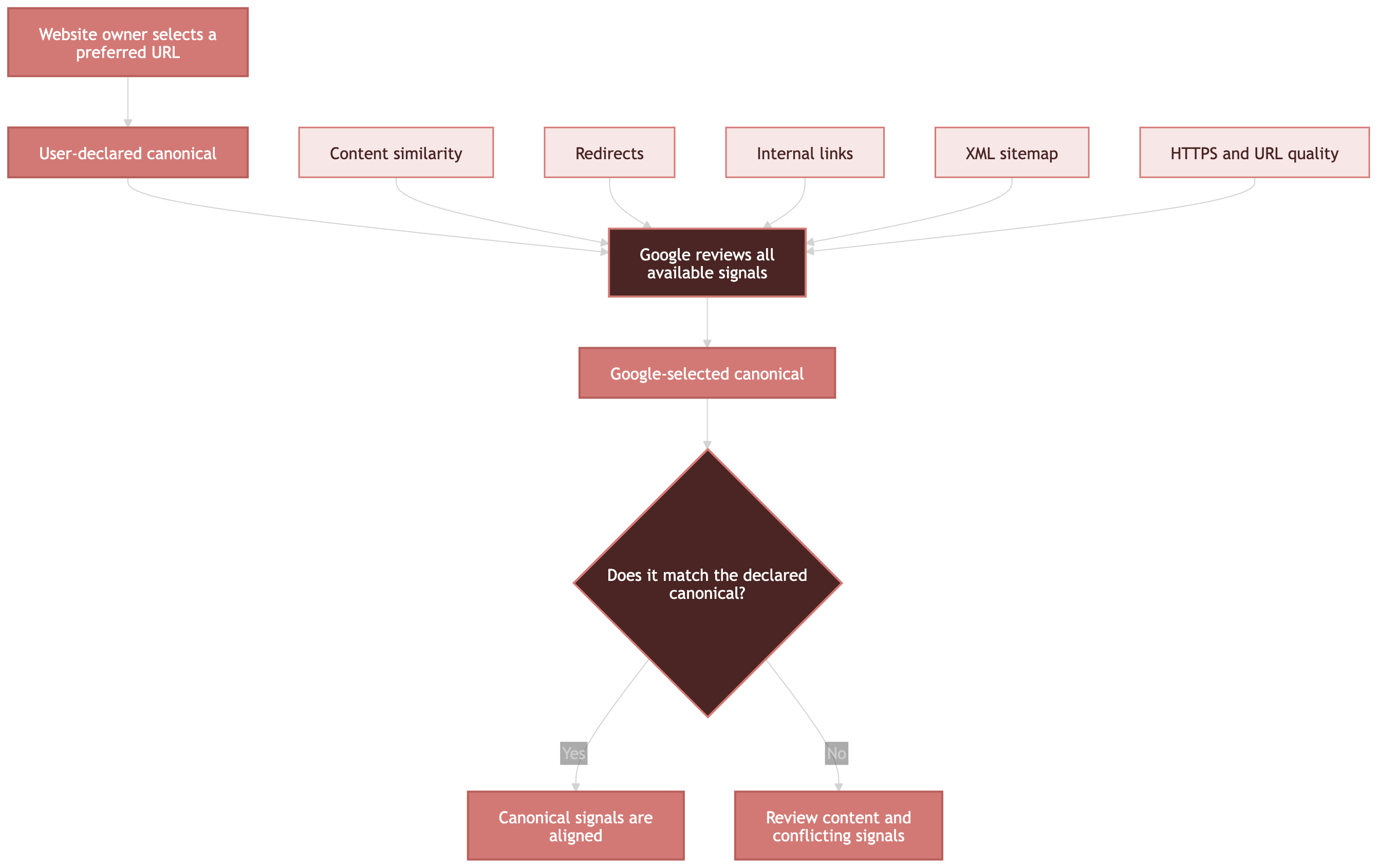
A user-declared canonical is the URL your website tells Google to prefer.
A Google-selected canonical is the URL Google finally chooses.
These URLs may not always match.
A canonical tag is a strong signal, but it is not a command. Google may select another URL when its systems believe that page offers a better canonical version.
Google Search Console shows both values inside the URL Inspection tool:
- User-declared canonical: The URL named by your page or other signals.
- Google-selected canonical: The URL Google chose after reviewing similar pages.
Before changing anything, check whether Google’s selected URL is actually a better choice for users. In some cases, Google may have identified a cleaner or more complete page.
How Strong Are Different Canonical Signals?
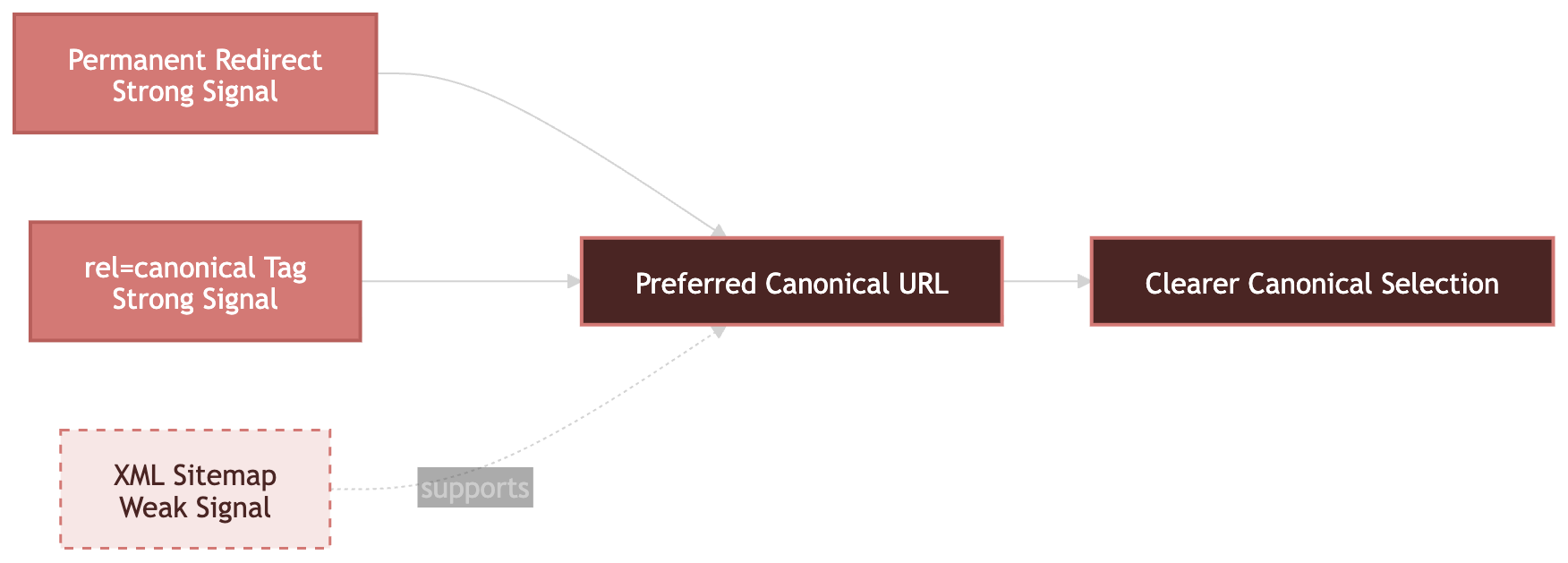
Google supports several ways to show your preferred canonical URL.
| Canonical method | Signal strength | Best use |
|---|---|---|
| Permanent redirect | Strong | Removing or replacing an old duplicate URL |
rel="canonical" tag |
Strong | Keeping similar URLs available while naming a preferred version |
| Sitemap inclusion | Weak | Supporting your canonical choice across many pages |
These signals can work together.
For example, your preferred URL can use a self-referencing canonical tag, appear in the XML sitemap, and receive internal links. Consistent signals make your preference easier to understand.
Conflicting signals create confusion. Do not name one canonical URL in the page code while listing a different version in the sitemap.
How to Fix Duplicate Pages Before Re-Evaluation?
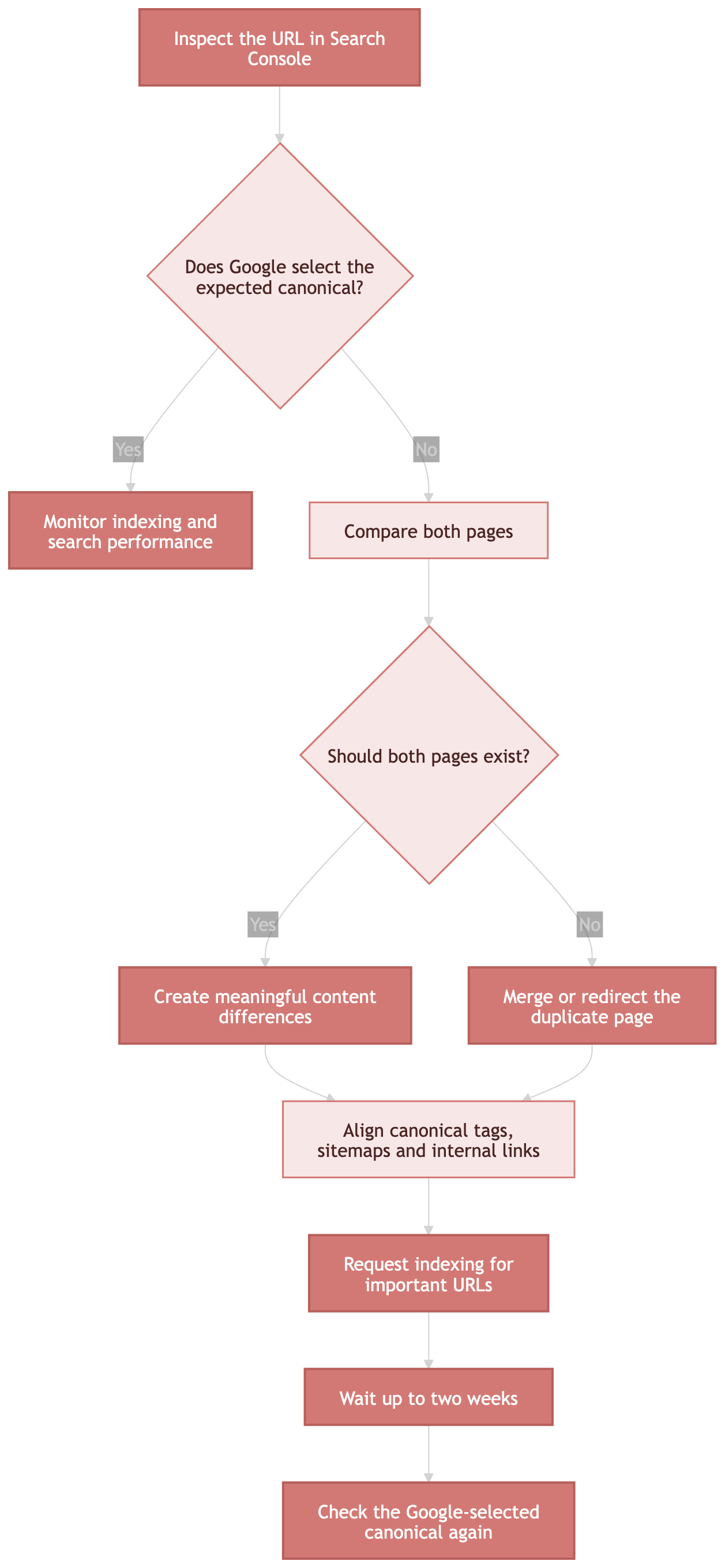
Follow these steps when Google chooses a different canonical because pages look too similar.
Step 1: Inspect the URL in Search Console
Open the URL Inspection tool and enter the complete page URL.
Check:
- indexing status
- user-declared canonical
- Google-selected canonical
- last crawl information
- whether crawling and indexing are allowed
Remember that the live test cannot predict which canonical Google will choose. Canonical selection appears in Google’s indexed data.
Step 2: Compare the Clustered Pages
Review the preferred page and the page Google selected.
Look beyond titles and headings. Compare the main content, purpose, products, services, examples, and user value.
Changing only a city, product colour, or keyword may not create a meaningful difference.
Step 3: Decide Whether Both Pages Should Exist
Not every duplicate page needs separate indexing.
Ask these questions:
- Do both pages serve different search needs?
- Does each page provide unique value?
- Would users benefit from finding both pages?
- Can the pages be combined without losing useful information?
Merge or redirect a page when it has no clear independent purpose.
Step 4: Create Clear Content Differences
When both pages need to remain searchable, make their main content distinct.
Useful changes may include:
- different answers to different search questions
- original product or service details
- unique examples and case studies
- location-specific information
- separate pricing or availability details
- original images, charts, or comparisons
- page-specific frequently asked questions
Do not rewrite sentences only to make them sound different. The page itself should serve a different purpose.
Step 5: Align Your Canonical Signals
Make sure your technical signals support the same URL.
Check the following items:
- self-referencing canonical tag
- canonical tags on duplicate versions
- XML sitemap URLs
- internal links
- redirects
hreflangannotations- HTTP and HTTPS versions
- mobile and desktop versions
Google advises using absolute URLs in canonical tags. An absolute URL includes the complete protocol and domain.
Step 6: Request Re-Indexing for Important Pages
After fixing the content, use Request Indexing for your most important URLs.
Google says this feature has daily limits. A request also does not guarantee immediate crawling, indexing, or canonical selection.
For many changed pages, update your XML sitemap instead. Add accurate <lastmod> dates so Google can identify recently updated URLs.
Step 7: Wait Before Reversing the Fix
Do not assume the update failed after one or two days.
Google may need up to two weeks to move a page out of a duplicate cluster. The page may clear sooner when the difference is clear and significant.
Avoid making repeated changes during this period unless you find a real error. Constant edits can make troubleshooting harder.
What to Monitor During the Waiting Period?
Use Search Console to monitor the affected URLs.
URL Inspection
Inspect the page to see whether Google has crawled the updated version. Review the Google-selected canonical after new indexed data becomes available.
Page Indexing Report
Look for statuses such as:
- Duplicate, Google chose different canonical than user
- Duplicate without user-selected canonical
- Alternate page with proper canonical tag
- Crawled, currently not indexed
These labels describe different situations. Do not treat every duplicate status as the same problem.
Search Performance
Watch impressions, clicks, and average position for the preferred URL.
Canonical changes can affect which URL receives Search data. Give the reporting system time to reflect the new selection.
Server Logs
Server logs can confirm whether Googlebot revisited the affected pages. A fresh crawl is usually needed before Google can process the changes.
Common Canonical Re-Evaluation Mistakes
Changing Only the Canonical Tag
A canonical tag may not solve a content-clustering issue by itself.
When two pages need separate indexing, their main content must be different enough to justify separate search results.
Blocking the Page in Robots.txt
Do not use robots.txt for canonicalization.
When Google cannot crawl the page, it may not see the canonical tag or updated content. A blocked URL may also appear in Search without a useful description.
Using Noindex Instead of a Canonical
A noindex directive removes a page from Google Search. It does not tell Google to transfer all signals to another URL.
Google recommends canonical annotations for duplicate URLs within a site.
Sending Conflicting Signals
A page should not point to one canonical URL while internal links, redirects, and sitemaps support another.
Choose one preferred version and apply it consistently.
Requesting Indexing Again and Again
Repeated submissions do not guarantee faster results.
Request Indexing is subject to limits. Google recommends using it for important URLs rather than every page in a large duplicate cluster.
Expecting Every Page to Be Indexed
Google does not need to index every valid URL.
A page can be crawlable and technically correct while still being excluded because another page offers nearly the same content.
A Practical Canonical Re-Evaluation Checklist
Before waiting for Google to reassess your pages, confirm that:
- both pages have a clear and separate purpose
- the main content is meaningfully different
- the preferred URL uses a self-referencing canonical
- duplicate versions point to the correct canonical
- the XML sitemap lists preferred URLs only
- internal links use the preferred URL
- no conflicting redirects exist
- crawling is not blocked
- no unwanted
noindexdirective is present - important pages have been submitted for re-indexing
When all these signals agree, Google has a clearer basis for selecting the correct canonical.
Did You Know?
Google’s July 10, 2026 documentation update did not announce a new ranking system. It added a clearer timeline so site owners know that content-based canonical fixes may need up to two weeks to take effect.
Conclusion
Google canonical re-evaluation can take up to two weeks when pages remain grouped because their content looks too similar. Therefore, do not judge a content fix after only a few days.
First, confirm the Google-selected canonical in Search Console. Then make each page’s purpose and main content clearly different. Finally, align your canonical tags, sitemaps, internal links, and redirects.
Clear content and consistent technical signals give Google the best chance to understand which pages should remain separate.
FAQs
How long does Google canonical re-evaluation take?
Google says re-evaluation may take up to two weeks after you fix content issues that caused pages to enter a duplicate cluster. Some pages may separate sooner, especially when their new content is clearly and significantly different.
Can Request Indexing speed up canonical re-evaluation?
Request Indexing can ask Google to crawl and reassess an important URL. However, it does not guarantee faster canonical selection or indexing. The feature also has daily limits, so Google advises saving it for high-priority pages.
Why does Google ignore my canonical tag?
Google may choose another URL when signals conflict or when another page appears more useful. Content similarity, redirects, internal links, sitemap entries, HTTPS settings, and page quality can all influence Google’s canonical selection.
Should duplicate pages have unique content?
Pages that need separate indexing should offer clear and useful differences. Small word changes may not be enough. Each page should answer a distinct need through unique details, examples, services, products, locations, or supporting information.
Is a canonical tag the same as a redirect?
No. A canonical tag lets duplicate or similar pages remain accessible while naming a preferred version. A redirect sends users and crawlers to another URL. Google treats permanent redirects and canonical tags as strong canonical signals.
References
- https://www.searchenginejournal.com/google-says-canonical-re-evaluation-can-take-up-to-two-weeks/582053/
- https://developers.google.com/search/docs/crawling-indexing/canonicalization-troubleshooting
- https://developers.google.com/search/docs/crawling-indexing/consolidate-duplicate-urls
- https://developers.google.com/search/docs/crawling-indexing/canonicalization
- https://support.google.com/webmasters/answer/9012289
- https://developers.google.com/search/updates